
How Screen Posture Disorders Are Slowly Changing Your Body Without You Realizing It
Screens are now part of almost every aspect of modern life. We work on computers, attend meetings through laptops, check smartphones, browse social media, watch videos, and spend hours interacting with digital devices.
The problem is not simply how long we use screens. It is also how we position our bodies while using them.
Leaning toward a monitor, looking down at a phone, rounding the shoulders, bending the neck, or sitting in one position for hours can place repeated physical demands on the body. Poor workstation setup, repetitive tasks, and static awkward positions are recognized risk factors for musculoskeletal problems.
These habits may seem harmless at first. A little neck stiffness at the end of the day may not seem important. But when the same position is repeated every day, discomfort can gradually become part of your routine.
What Is Screen Posture?
Screen posture describes how you position your head, neck, shoulders, back, arms, wrists, and legs while using a digital device.
It is influenced by:
Screen height and distance
Chair and desk height
Keyboard and mouse position
Laptop design
Phone usage
Lighting and screen glare
Length of time spent sitting
How frequently you change position
There is no single perfect posture that needs to be maintained throughout the day. A better goal is a comfortable workstation combined with regular movement and changes in position.
How Screen Use Affects the Body
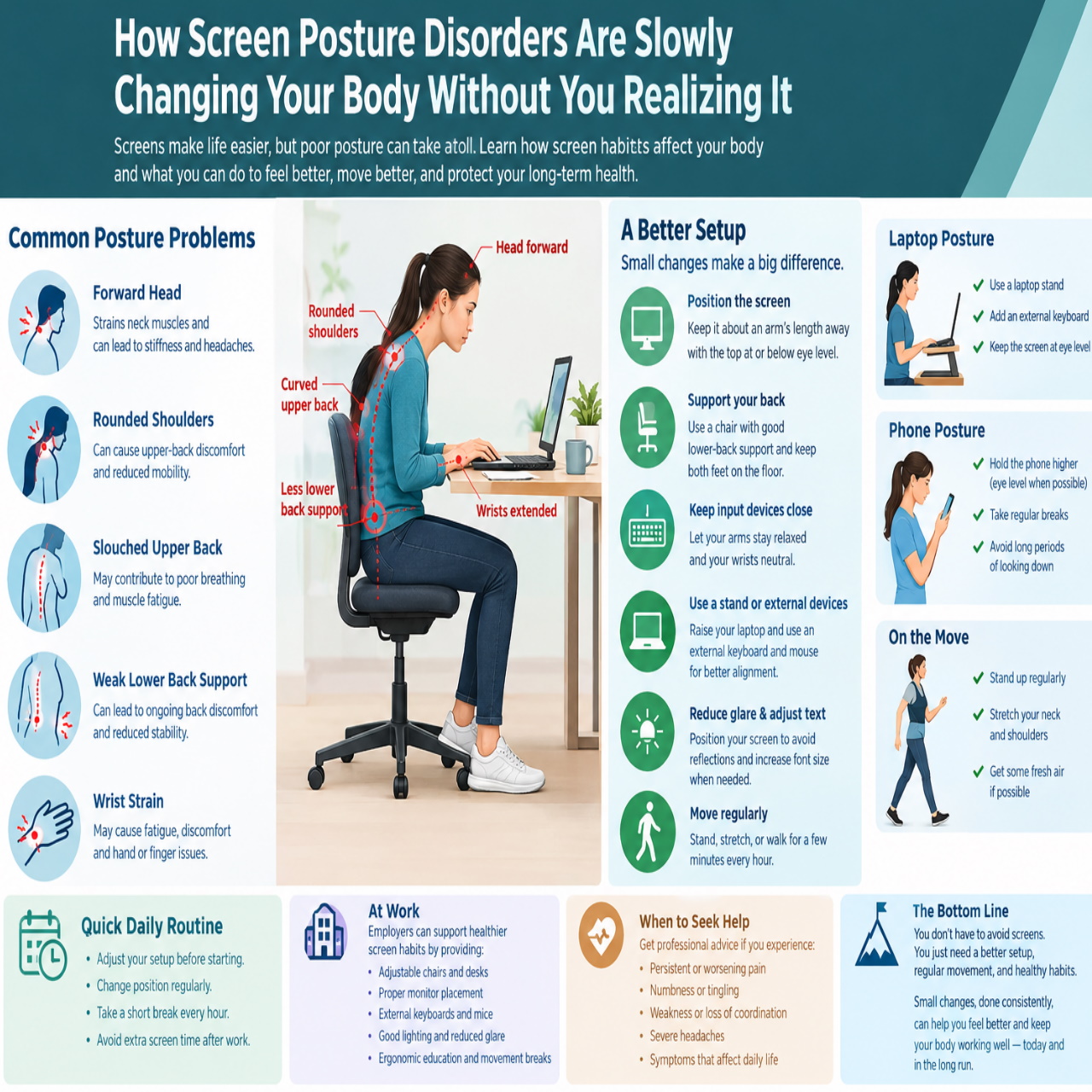
When you spend a long time looking at a screen, your body may gradually move toward the screen without you consciously noticing.
Your head may move forward.
Your neck may bend downward.
Your shoulders may round.
Your upper back may become more curved.
Your lower back may lose support.
Your wrists may remain in a fixed position.
These positions are not necessarily harmful for short periods. The concern is the combination of awkward posture, repetition, and long duration.
NIOSH identifies static awkward posture and repetitive work involving awkward neck positions among factors associated with musculoskeletal disorders.
The Neck and Shoulders
The neck and shoulders often show the earliest signs of prolonged screen work.
When the head moves forward toward a screen, the muscles around the neck and upper back may need to work continuously to maintain the position.
You may eventually notice:
Neck stiffness
Shoulder tightness
Upper-back discomfort
Muscle fatigue
Difficulty getting comfortable
Screen and workstation conditions can contribute to forward head and torso positions. Research indexed by NIOSH has also found that factors such as small text and screen glare can encourage users to lean toward the display.
Instead of repeatedly forcing your shoulders backward, focus on bringing the screen and input devices into a comfortable position and changing your posture regularly.
The Upper and Lower Back
Back discomfort can also develop when screen work involves prolonged sitting.
A low laptop screen may encourage you to bend your neck and upper back forward. Meanwhile, a poorly adjusted chair can leave the lower back without adequate support.
NIOSH recommends supporting the natural inward curve of the lower back and varying your posture rather than remaining in one position for long periods.
The important point is that screen-related posture is not limited to the neck. The entire sitting position contributes to how your body feels after several hours of work.
Why Laptop Use Can Be Challenging
Laptops are convenient because the screen and keyboard are connected.
That convenience also creates an ergonomic compromise.
If the laptop is positioned comfortably for typing, the screen may be too low. If the screen is raised to a comfortable viewing height, the keyboard may become difficult to use.
Research on notebook computer use has identified differences in head, neck, wrist, and upper-extremity posture depending on how the device is positioned.
For extended desk work, a practical solution is to:
Raise the laptop screen
Use an external keyboard
Use an external mouse
Adjust the chair appropriately
Change position regularly
This allows the screen and hands to be positioned independently.
Smartphone Posture
Smartphones create a similar problem because people frequently hold them below eye level.
Looking downward for long periods can keep the neck in a flexed position.
This commonly happens while:
Scrolling social media
Reading messages
Watching videos
Browsing the internet
Working from a phone
Using the phone in bed
You do not need to hold your phone at eye level constantly. However, for longer periods of reading or viewing, raising the device and taking regular breaks can reduce the amount of time spent in a deeply downward-looking position.
The Hidden Problem: Staying Still
One of the biggest issues with screen work is prolonged static posture.
You might begin working in a comfortable position and remain almost unchanged for an hour or more.
This can happen because of:
Long meetings
Focused computer work
Gaming
Programming
Writing
Video editing
Online learning
Watching content
The body generally benefits from movement and variation rather than maintaining the same position for extended periods.
The CDC recommends taking short breaks during computer work, including changing position and moving regularly.
Warning Signs to Notice
Your body can provide early signals that your workstation or habits need attention.
Common signs include:
Frequent neck stiffness
Shoulder tension
Upper-back discomfort
Lower-back discomfort
Wrist or hand fatigue
Headaches associated with prolonged screen use
Tingling or numbness
Reduced comfort while sitting
Needing to stretch frequently after computer work
These symptoms can have many causes and should not automatically be blamed on screen posture.
Persistent, severe, worsening, or unusual symptoms should be assessed by an appropriate healthcare professional.
How to Create a Better Screen Setup
A better workstation does not necessarily require expensive equipment.
Start by adjusting the basic relationship between your eyes, screen, hands, chair, and desk.
Position the Monitor
Keep your primary screen directly in front of you.
NIOSH recommends placing an external monitor approximately an arm's length away, with the top of the monitor at or below eye level.
This can reduce the need to repeatedly bend your neck or lean toward the display.
Adjust the Laptop
For extended laptop work, consider using:
A laptop stand or raised surface
An external keyboard
An external mouse
This gives you more flexibility to position the screen and hands separately.
Support Your Back
Use a chair that provides suitable lower-back support.
Your feet should be comfortably supported, and your chair height should allow you to work without constantly leaning forward.
Keep Input Devices Close
The keyboard and mouse should be close enough that you do not have to repeatedly reach forward.
Try to keep your shoulders relaxed while typing or using the mouse.
Manage Glare and Text Size
Screen glare can make it harder to see the display and may encourage you to move closer.
Position the screen to reduce reflections from windows and strong lights.
If text is difficult to read, increase the font size instead of leaning toward the screen. NIOSH also recommends increasing font size as one way to reduce eyestrain during laptop use.
Move Instead of Holding One Position
Good ergonomics is not only about equipment.
Movement is equally important.
During a working session, try to:
Stand periodically
Walk for a few minutes
Change sitting position
Relax your shoulders
Move your neck gently
Look away from the screen
Take short breaks between tasks
The objective is not to maintain a perfect posture for eight hours. It is to avoid spending eight hours in the same posture.
A Simple Daily Routine
A practical screen-work routine can be simple.
Before work:
Adjust the chair.
Position the screen.
Place the keyboard and mouse comfortably.
Check your lighting.
During work:
Avoid continuously leaning toward the screen.
Change position regularly.
Keep your shoulders relaxed.
Take short movement breaks.
Every hour:
Stand or walk briefly.
Look away from the screen.
Change your working position.
After work:
Avoid immediately replacing computer time with several more hours of phone use.
Give your body opportunities to move and recover from prolonged sitting.
Workplace Ergonomics
Screen posture is not only an individual responsibility.
Employers can create better working environments by providing:
Adjustable chairs
Suitable desks
Properly positioned monitors
External keyboards and mice
Adequate lighting
Ergonomic guidance
Opportunities for movement breaks
Employees should also report recurring discomfort rather than waiting until the problem becomes severe.
The CDC recommends addressing awkward postures and prolonged sitting or standing through both equipment adjustments and changes to work activities.
Can Posture Habits Be Changed?
Yes.
Posture is influenced by daily habits, workstation design, and activity levels. Small changes can make a workstation more comfortable and reduce unnecessary physical strain.
Research indexed by NIOSH found improvements in computer-related musculoskeletal symptoms after personalized workstation adjustments, including changes to monitor height, chair height, and arm support.
The best setup depends on the individual, so adjustments should be based on your body, equipment, tasks, and working environment.
When to Seek Professional Help
Not every neck, shoulder, back, or wrist problem is caused by screen posture.
Consider professional medical advice if you experience:
Persistent or worsening pain
Significant weakness
Ongoing numbness or tingling
Loss of coordination
Pain after an injury
Severe or unusual headaches
Symptoms that interfere with normal activities
A healthcare professional can help determine the underlying cause and recommend appropriate treatment.
Conclusion
Screen posture problems usually develop through ordinary habits repeated over long periods.
Leaning toward a monitor, looking down at a phone, using a poorly positioned laptop, sitting without adequate support, or remaining still for hours can all contribute to physical discomfort.
The solution is not to stop using screens or try to hold a rigid posture all day.
Instead, focus on a practical combination of:
A suitable workstation
Correct screen positioning
Comfortable keyboard and mouse placement
Adequate back support
Regular movement
Frequent changes in position
Early attention to discomfort
Your body was designed to move, not remain fixed in front of a screen for hours.
Small adjustments made consistently can help make long periods of digital work more comfortable and sustainable.
How Screen Posture Disorders Are Slowly Changing Your Body Without You Realizing It
Learn how prolonged screen use and poor posture can affect your neck, shoulders, back, and wrists, plus practical ways to improve your daily screen setup.
◉ 36 views◇ 0 comments



0 comments
Be the first to add a thoughtful comment.
Leave a comment
Your email will not be published. Comments are moderated.