
Introduction to Data Engineering on Google Cloud
Data has become one of the most important assets for modern businesses. Applications, websites, mobile devices, IoT systems, customer interactions, transactions, and business operations generate enormous amounts of information every day.
However, collecting data is only the beginning.
Organizations need reliable systems to collect, store, process, transform, secure, and deliver that data so it can be used for analytics, reporting, machine learning, and business decision-making.
This is where data engineering becomes important.
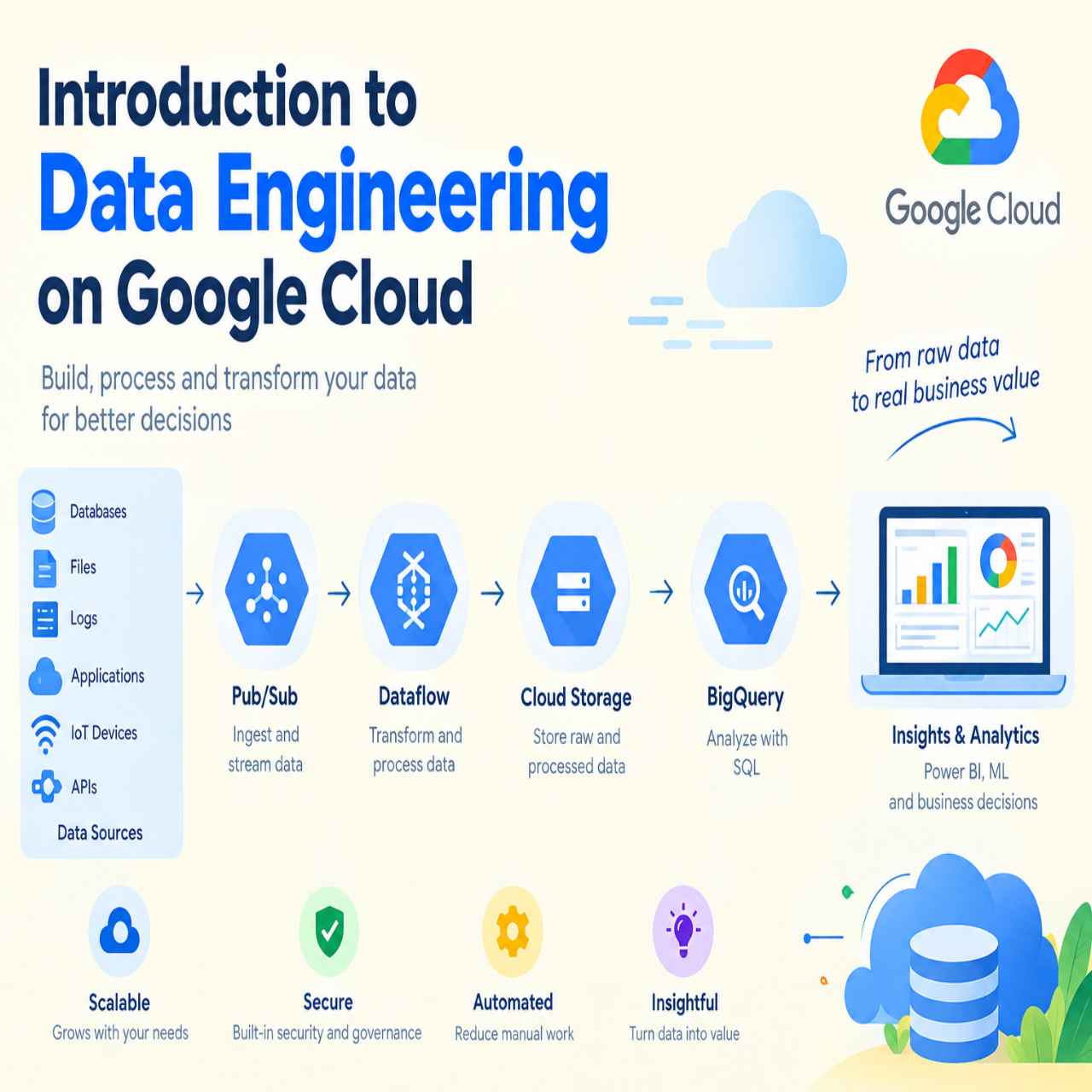
Google Cloud provides a broad set of managed services that can help organizations build scalable data platforms without managing every part of the underlying infrastructure themselves. Key services include Cloud Storage, BigQuery, Pub/Sub, Dataflow, and other data and analytics technologies.
Google's current Professional Data Engineer framework describes the role around designing data processing systems, ingesting and processing data, storing data, preparing data for analysis, and maintaining and automating data workloads.
What Is Data Engineering?
Data engineering is the practice of designing, building, operating, and maintaining systems that move and transform data.
A data engineer creates the infrastructure and pipelines that allow raw data to become useful information.
A typical data engineering process may look like this:
Data sources
↓
Data ingestion
↓
Data storage
↓
Data processing
↓
Data transformation
↓
Data quality and governance
↓
Analytics and reporting
↓
Business decisions
For example, an online business may collect customer orders from its website, application, and payment system. A data engineering platform can bring this information together, clean and transform it, store it in an analytical data warehouse, and make it available to business intelligence tools.
What Is Google Cloud?
Google Cloud is Google's cloud computing platform, providing infrastructure, databases, analytics, artificial intelligence, machine learning, storage, networking, security, and application development services.
For data engineering, Google Cloud provides managed services that can be combined to create data pipelines and analytics platforms.
Instead of purchasing and maintaining physical servers, organizations can use cloud services and scale resources according to their requirements.
Why Data Engineering Matters
Modern businesses generate data from many different sources.
These may include:
Web applications
Mobile applications
Customer relationship management systems
Enterprise resource planning systems
Payment platforms
Databases
IoT devices
Server logs
Marketing platforms
E-commerce systems
Third-party APIs
The challenge is that this information may exist in different formats and systems.
Data engineering helps bring these sources together and create reliable data flows.
A well-designed data engineering platform can help organizations:
Centralize data
Automate data processing
Improve data quality
Support real-time analytics
Build business dashboards
Reduce manual data preparation
Support machine learning
Improve decision-making
Scale data workloads
Key Google Cloud Services for Data Engineering
Google Cloud provides several services that are particularly relevant to data engineering.
Cloud Storage
Google Cloud Storage provides object storage that can be used to store files and large amounts of unstructured or semi-structured data.
Organizations can use Cloud Storage as part of a data lake architecture to store information such as:
CSV files
JSON files
Application logs
Images
Documents
Backup files
Data exports
Raw datasets
Cloud Storage can serve as an initial landing location before data is processed and transformed.
BigQuery
BigQuery is Google's fully managed and serverless data warehouse.
It is designed for large-scale analytical workloads and allows organizations to query large datasets using SQL.
A common architecture may involve collecting raw information in Cloud Storage, processing it with Dataflow or other services, and storing analytical datasets in BigQuery.
BigQuery can then support:
Business intelligence
Reporting
Data analysis
Data exploration
Machine learning workflows
Operational analytics
Customer analytics
Financial analysis
Because BigQuery is managed by Google Cloud, organizations do not have to manage traditional data warehouse infrastructure in the same way they would with an on-premises system.
Pub/Sub
Google Cloud Pub/Sub is a messaging service designed for asynchronous communication between applications and services.
Publishers send events to Pub/Sub, and subscribers receive those events for further processing. Google Cloud documents Pub/Sub as a common option for ingesting user interactions, server events, and other streaming data.
For example:
Customer places an order
↓
Application publishes an order event
↓
Pub/Sub receives the event
↓
Dataflow processes the event
↓
BigQuery stores the analytical data
This architecture can support near-real-time data processing.
Dataflow
Google Cloud Dataflow is a managed service for batch and stream data processing.
It can create pipelines that read data from one or more sources, transform the information, and write the results to a destination. Google Cloud describes Dataflow as supporting unified stream and batch processing at scale.
Dataflow uses Apache Beam as its programming model.
Typical Dataflow use cases include:
ETL pipelines
Data migration
Streaming analytics
Log processing
IoT data processing
Data transformation
Machine learning data preparation
Data integration
For example, a Dataflow pipeline can receive JSON events from Pub/Sub, transform the information, and write the results into BigQuery. Google provides documented templates for this type of workflow.
A Simple Google Cloud Data Pipeline
A beginner-friendly data pipeline might look like this:
Application
↓
Pub/Sub
↓
Dataflow
↓
BigQuery
↓
BI dashboard
Here is what happens at each stage.
Step 1: Data Generation
An application generates information such as customer orders, website activity, or application events.
Step 2: Data Ingestion
The application publishes events to Pub/Sub.
Step 3: Data Processing
Dataflow reads the events and transforms them.
Step 4: Data Storage
The processed information is written to BigQuery.
Step 5: Data Analysis
Analysts and business applications query the data in BigQuery.
Step 6: Business Intelligence
Dashboards and reports use the processed data to provide business insights.
Google Cloud provides official examples for streaming data from Pub/Sub to BigQuery using Dataflow.
Batch Processing vs Real-Time Processing
Data engineering workloads are commonly divided into batch processing and stream processing.
Batch Processing
Batch processing handles data in groups.
For example, a company may process yesterday's sales transactions every night.
A batch pipeline could look like:
Daily files
↓
Cloud Storage
↓
Dataflow
↓
BigQuery
This approach is suitable when information does not need to be processed immediately.
Stream Processing
Stream processing handles data continuously as events arrive.
For example:
Customer places an order
↓
Event sent to Pub/Sub
↓
Dataflow processes event
↓
BigQuery receives data
↓
Dashboard updates
This can be useful for applications requiring timely information.
Google Cloud Dataflow supports both batch and streaming pipelines.
Data Lakes and Data Warehouses
Two important concepts in data engineering are data lakes and data warehouses.
A data lake generally stores large amounts of raw or relatively unprocessed data in different formats.
Cloud Storage can be used as part of a data lake architecture.
A data warehouse is optimized for analytical querying and structured business data.
BigQuery is Google's cloud data warehouse.
A company may therefore use both:
Cloud Storage for raw data
BigQuery for analytical data
Dataflow for processing
Pub/Sub for streaming ingestion
This combination can create a flexible data platform.
ETL and ELT
Two common approaches to data processing are ETL and ELT.
ETL means:
Extract
Transform
Load
Data is extracted from a source, transformed, and then loaded into the target system.
ELT means:
Extract
Load
Transform
Data is first loaded into the target environment and transformed afterward.
Modern cloud data platforms often make ELT practical because cloud data warehouses can perform large-scale transformations.
For example:
Operational database
↓
Load data
↓
BigQuery
↓
Transform with SQL
↓
Analytics tables
The appropriate architecture depends on the organization's data volume, processing requirements, security needs, and business objectives.
Data Modeling
Data modeling is another important part of data engineering.
A data model determines how information is organized and related.
For example, an e-commerce business might have:
Customers
Products
Orders
Order Items
Payments
Shipments
A data engineer must determine how these entities relate to each other and how the resulting data should be organized for analytics.
Good data modeling can improve:
Query performance
Data consistency
Reporting
Data governance
Maintainability
Analytics
Data Quality
Reliable analytics requires reliable data.
Data quality problems can occur because of:
Missing values
Duplicate records
Incorrect formats
Invalid dates
Incorrect customer IDs
Inconsistent names
Incomplete transactions
Unexpected values
A data engineering pipeline should therefore include data validation and quality checks.
For example, an order dataset might validate that:
Order ID is present
Customer ID is valid
Order date is correctly formatted
Product ID exists
Quantity is greater than zero
Payment status contains an accepted value
Data quality should be treated as part of the pipeline rather than an afterthought.
Data Security and Governance
Data engineering also involves security and governance.
Organizations may process sensitive customer, financial, operational, or employee information.
Important considerations include:
Identity and access management
Encryption
Data classification
Access controls
Audit logging
Data retention
Regulatory requirements
Data masking
Secure service-to-service communication
A data platform should ensure that users and applications can access only the information they are authorized to use.
Monitoring Data Pipelines
A production data pipeline must be monitored.
A pipeline can fail because of:
Network problems
Invalid data
Schema changes
Application errors
Service failures
Unexpected data volumes
Permission problems
A monitoring strategy should help teams identify:
Failed pipelines
Processing delays
Data quality issues
Backlogs
Unusual data volumes
Performance problems
Operational alerts
For example, Google Cloud documents methods for handling growing Pub/Sub backlogs in Dataflow pipelines, including scaling processing capacity when necessary.
Data Engineering and Machine Learning
Data engineering provides an important foundation for machine learning.
Machine learning systems need data for:
Training
Validation
Testing
Feature generation
Model evaluation
Production predictions
A typical architecture may look like:
Business applications
↓
Data ingestion
↓
Cloud Storage and BigQuery
↓
Data processing
↓
Machine learning
↓
Predictions
↓
Business applications
Poor-quality or poorly organized data can affect the performance of downstream machine learning systems.
This makes data engineering an important part of modern AI and machine learning projects.
Data Engineering for Business Intelligence
Business intelligence depends heavily on reliable data pipelines.
Consider a company with sales information stored in multiple systems.
A data engineering platform can bring the information together and create a consistent analytical model.
For example:
CRM data
*
E-commerce data
*
Payment data
*
Marketing data
↓
Data pipeline
↓
BigQuery
↓
Business intelligence dashboard
Business users can then analyze:
Sales performance
Customer behavior
Product performance
Marketing campaigns
Regional performance
Revenue trends
This reduces dependence on manually prepared spreadsheets and disconnected reports.
Data Engineering and APIs
Many modern businesses receive information through APIs.
For example, a business may integrate:
Payment APIs
CRM APIs
Marketing APIs
Shipping APIs
Social media APIs
Third-party business applications
Data engineering pipelines can ingest information from these APIs, transform it into a consistent structure, and store it for analysis.
API-based data integration is particularly useful when an organization operates several SaaS platforms.
Common Data Engineering Challenges
Building a data platform on Google Cloud does not eliminate data engineering challenges.
Common issues include:
Complex data sources
Poor data quality
Legacy systems
Changing schemas
High data volumes
Security requirements
Pipeline failures
Cost management
Lack of technical expertise
Integration complexity
Organizations should therefore design data platforms with reliability, scalability, security, and maintainability in mind.
Managing Google Cloud Data Costs
Cloud data platforms provide flexibility, but organizations still need to manage costs.
Potential cost drivers include:
Data storage
Data processing
Data transfer
Streaming workloads
Large analytical queries
Pipeline execution
Data retention
Poorly optimized queries
Cost management practices can include:
Removing unnecessary data
Using appropriate storage options
Optimizing queries
Monitoring resource consumption
Setting budgets and alerts
Reviewing unused resources
Designing efficient pipelines
Data engineers should consider cost as part of architecture rather than only reviewing it after deployment.
Learning Data Engineering on Google Cloud
Someone starting with Google Cloud data engineering should build knowledge progressively.
A practical learning path can be:
Step 1: Learn cloud fundamentals
Understand projects, regions, IAM, networking, storage, and basic cloud architecture.
Step 2: Learn SQL
SQL is fundamental for querying and transforming analytical data.
Step 3: Learn BigQuery
Understand datasets, tables, queries, schemas, partitions, and analytical workloads.
Step 4: Learn Cloud Storage
Understand buckets, objects, permissions, and data lake concepts.
Step 5: Learn Pub/Sub
Understand topics, subscriptions, publishers, subscribers, and event-driven ingestion.
Step 6: Learn Dataflow
Understand batch and streaming pipelines and Apache Beam concepts.
Step 7: Learn data modeling
Understand how to organize data for analytics and reporting.
Step 8: Learn data governance
Study security, access control, data quality, and compliance.
Step 9: Build projects
Create practical pipelines using realistic datasets.
Step 10: Learn monitoring and optimization
Understand how to troubleshoot pipelines, improve performance, and manage costs.
Google's Professional Data Engineer certification currently covers areas including data processing systems, ingestion and processing, storage, data preparation for analysis, and maintaining and automating workloads. Google recommends industry experience, including experience designing and managing Google Cloud solutions, although the certification itself lists no formal prerequisites.
A Beginner Project
A useful first project is an e-commerce analytics pipeline.
Imagine an online store generating order events.
The architecture could be:
E-commerce application
↓
Pub/Sub
↓
Dataflow
↓
BigQuery
↓
Analytics dashboard
The project could capture:
Customer ID
Order ID
Product ID
Quantity
Price
Order timestamp
Payment status
The Dataflow pipeline could validate and transform the incoming information before storing it in BigQuery.
Once the data is available, SQL queries could calculate:
Total sales
Daily revenue
Top-selling products
Average order value
Customer purchase frequency
Sales by region
This type of project demonstrates the fundamental concepts of data engineering without requiring an extremely complicated architecture.
Best Practices for Google Cloud Data Engineering
Start with the business requirement
Technology should support a clearly defined business objective.
Design for scalability
Consider how data volume may change over time.
Automate pipelines
Reduce manual data movement and processing.
Validate data
Implement quality checks before data reaches important analytical systems.
Secure data
Apply appropriate identity, access, and governance controls.
Monitor pipelines
Track failures, latency, processing volume, and system health.
Optimize queries
Efficient SQL and data organization can improve performance and control costs.
Document data
Maintain information about datasets, schemas, ownership, and transformations.
Plan for schema changes
Applications and data structures evolve, so pipelines should be designed to handle change.
Keep architectures as simple as practical
Not every project requires every Google Cloud service.
Conclusion
Data engineering is the foundation that turns raw information into usable business data.
Google Cloud provides managed services that can support the complete data engineering lifecycle, from ingestion and storage to processing, analytics, and machine learning.
A typical architecture might combine Cloud Storage for data storage, Pub/Sub for event ingestion, Dataflow for batch and stream processing, and BigQuery for analytical workloads.
Google Cloud's current data engineering guidance emphasizes designing, building, deploying, monitoring, maintaining, optimizing, and securing data workloads.
For beginners, the most effective way to learn is to start with fundamental concepts such as SQL, data modeling, cloud storage, data ingestion, and data processing, and then build practical pipelines.
As organizations continue generating larger and more diverse datasets, data engineering will remain an important foundation for analytics, business intelligence, artificial intelligence, and data-driven decision-making.
Introduction to Data Engineering on Google Cloud
Learn the fundamentals of data engineering on Google Cloud, including BigQuery, Cloud Storage, Pub/Sub, Dataflow, data pipelines, analytics, security, and best practices.
◉ 37 views◇ 0 comments



0 comments
Be the first to add a thoughtful comment.
Leave a comment
Your email will not be published. Comments are moderated.